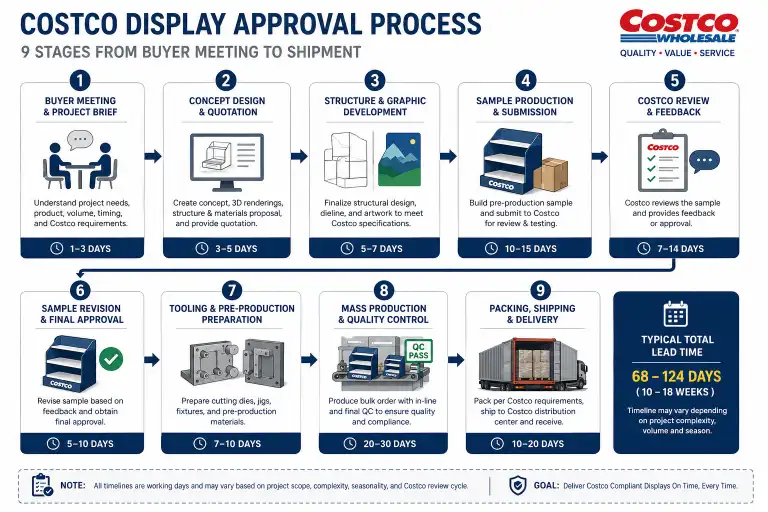
Getting a display approved for Costco is a multi-stage process that involves the buyer, the brand, and the factory. The Costco display approval process typically takes 8–16 weeks from initial buyer discussion to shipment, and every stage has specific requirements that must be met before moving to the next step.
For new vendors, the approval process can feel complex. Many suppliers underestimate how much time the sample and testing stages require. Others miss critical labeling or compliance details that cause rejection at the final stage.
This guide walks through the complete Costco display approval process — from the first buyer meeting to the finished display arriving at the Costco distribution center — with practical timelines and requirements for each step.
Overview of the Costco Display Approval Timeline
The full approval process from first buyer contact to shipment typically takes 8–16 weeks. Below is the typical timeline for a new display project.
| Stage | Duration | Responsible Party |
|---|---|---|
| Buyer discussion and requirements | 1–2 weeks | Brand + Costco buyer |
| Design and dieline development | 1–2 weeks | Brand + Factory |
| Structural sample and fit test | 1–2 weeks | Factory |
| Printed sample and visual approval | 1–2 weeks | Factory + Brand |
| Product-loaded sample and testing | 1–2 weeks | Factory |
| Label and artwork approval | 1 week | Brand + Costco buyer |
| Bulk production | 2–4 weeks | Factory |
| Pre-filled assembly and packing | 1–2 weeks | Factory |
| Shipment and delivery | 2–4 weeks | Factory + Forwarder |
| Total | 8–16 weeks |
For a complete overview of Costco display specifications, see our Costco Pallet Display Requirements guide.
Stage 1: Buyer Discussion and Requirements
The approval process begins with the Costco buyer. Without buyer interest, there is no project.
What Happens
- Initial contact — The brand reaches out to the Costco buyer (or the buyer identifies the brand)
- Product presentation — The brand presents the product and proposed display concept
- Requirements review — The buyer confirms or clarifies Costco-specific requirements:
- Display footprint (full GMA pallet, half pallet, or other)
- Height limit for the specific club location
- Pre-filled vs flat pack preference
- Labeling requirements
- Testing requirements
- Timeline and launch date
What the Buyer Needs From You
- Product information (size, weight, packaging format)
- Initial display concept or reference images
- Target launch date
- Estimated volume per store
- Number of stores in the rollout
Key Questions to Ask the Buyer
- What is the maximum display height for this program?
- Do you require pre-filled displays?
- Which labels do you need to approve (GS1-128, retail price, etc.)?
- What structural test reports do you require?
- Can you provide the current vendor compliance manual?
For guidance on working with display factories, see our Costco Display Manufacturer guide.
Stage 2: Design and Dieline Development
Once the buyer has confirmed interest, the brand works with the factory to develop the display design.
Design Process
| Step | Description |
|---|---|
| Brief the factory | Provide product dimensions, weight, SKU count, and buyer requirements |
| Structural design | Factory creates a structural design that meets Costco specifications |
| Dieline creation | Factory produces the cutting die layout for the display |
| Design review | Brand reviews the dieline and suggests changes |
| Final confirmation | Both parties agree on the structural design before sampling |
What Leader Display Provides
At this stage, the factory should confirm:
- GMA pallet compatibility (48×40 in)
- Board grade recommendation (B-flute, C-flute, BC-flute)
- Tray configuration (number of trays, tray dimensions, per-tier capacity)
- Total display height including pallet base
- Estimated weight per loaded display
The structural design must account for the product weight and partial sell-through stability from the beginning. Changes at the design stage cost nothing. Changes after sampling cost time and money.
For board grade options and structural specifications, see our PALLET DISPLAY product page.
Stage 3: Structural Sample and Fit Test
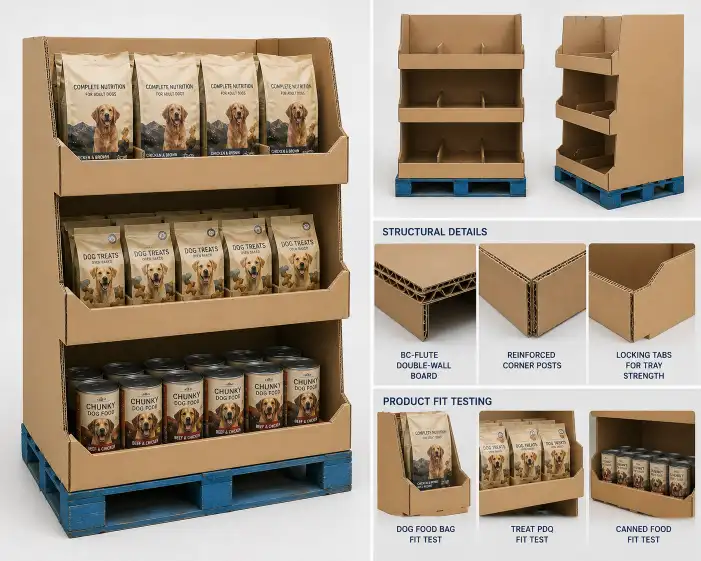
The first physical sample is a structural (blank) sample — unprinted, used to test fit and assembly.
Purpose
- Verify that all display components fit together correctly
- Confirm that products fit in the trays as designed
- Test assembly time and ease of assembly
- Identify structural weaknesses before printing
What to Check
| Check Item | Passing Criteria |
|---|---|
| Tray fit | Products fit without force, no overhang |
| Display assembly | All tabs and slots align correctly |
| Structural stability | Display stands level on the pallet base |
| Product load test | Trays hold the expected product weight without sagging |
| Tray removal | Products can be removed and replaced easily |
Sample Rounds
Most projects need 1–2 rounds of structural samples. Complex designs may need 3 rounds. Each round takes 5–10 days including production and shipping.
For sampling procedures, see our SAMPLING page.
Stage 4: Printed Sample and Visual Approval
After the structural design is confirmed, a printed sample is produced for visual approval.
Printed Sample Checkpoints
| Check | What to Verify |
|---|---|
| Color accuracy | Match brand colors to approved artwork |
| Print registration | All colors align correctly, no misregistration |
| Text readability | All copy is sharp and readable at actual size |
| Barcode scannability | All printed barcodes scan correctly |
| Surface finish | Coating or lamination is even and correct |
| Brand consistency | Logo, fonts, and colors match brand guidelines |
Digital vs Offset Samples
- Digital sample — Faster (2–3 days), good for color checking. Use for initial approval
- Offset sample — Accurate to production (run on actual production equipment). Use for final approval
The printed sample should be tested in a retail-like environment — placed at the expected display height and viewed from typical shopping distance.
For printing and finishing options, see our PRODUCTION page.
Stage 5: Product-Loaded Sample and Structural Testing
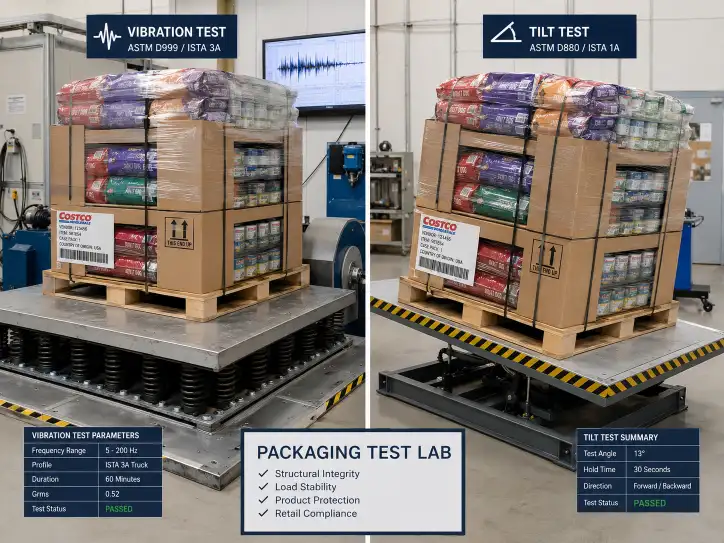
This is the most critical stage. The display is loaded with actual product and tested under simulated transit and retail conditions.
Required Tests
| Test | Purpose | Passing Criteria |
|---|---|---|
| ECT (compression) | Measures board stacking strength | Min 32 lbs/in (single-wall), 48+ (double-wall) |
| Vibration test | Simulates truck transit | No structural failure, no product damage |
| Drop test | Simulates handling | No damage from 6–12 in drops |
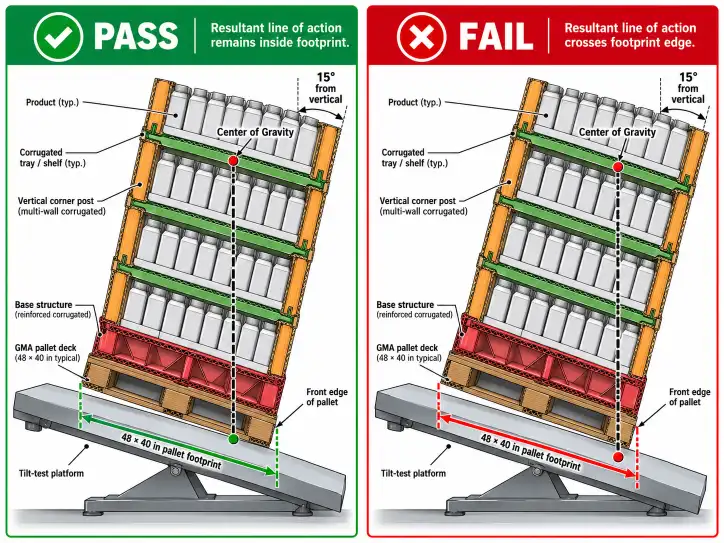
| Tilt test | Measures stability | Display must not tip at 15–20 degrees |
| Partial sell-through | Simulates product depletion | Display stable at 30%, 50%, 70% empty |
What to Send the Factory
For accurate testing, the factory needs actual product — not empty packaging or substitute products. Filled containers, sealed bags, and boxed items should be at retail weight.
Test Documentation
The factory should provide:
- Test report for each test performed
- Photos of the display during testing
- Video of vibration and tilt tests (upon request)
- Summary of test results with pass/fail for each criteria
For detailed testing specifications, see our Costco Pallet Display Requirements guide.
Stage 6: Label and Artwork Approval
Labels must be approved by the Costco buyer before production begins. Incorrect labels are the leading cause of receiving dock rejection.
Labels Requiring Approval
| Label | Approval Required From |
|---|---|
| GS1-128 pallet label | Costco buyer |
| Retail price label | Costco buyer |
| Carton content label | Brand (internal approval) |
| Handling labels | Brand (or factory standard) |
| Country of origin | Compliance requirement |
Label Approval Process
- Draft labels — Brand or factory creates label artwork based on Costco specifications
- Buyer submission — Label proofs are sent to the Costco buyer for review
- Buyer feedback — Buyer reviews for format, information accuracy, and compliance
- Revisions — Any corrections are made and resubmitted
- Final approval — Buyer provides written approval (email confirmation is sufficient)
Important
- Do not start production until all labels are approved in writing
- Label changes after production starts cause delays and waste
- Keep a copy of the buyer's approval email in the project file
Stage 7: Bulk Production and QC
With all samples and labels approved, the factory begins bulk production.
Production Stages
| Stage | Duration | QC Checkpoint |
|---|---|---|
| Raw material receiving | 1–2 days | Board grade, flute type, ECT verification |
| Printing | 3–7 days | Color check every 100–200 sheets |
| Die-cutting | 2–4 days | Cut quality and crease alignment |
| Assembly | 3–7 days | Glue strength, joint fit |
| Pre-filled loading | 3–7 days | SKU verification, barcode scanning |
QC During Production
The factory should:
- Provide in-process inspection photos at each stage
- Send a pre-shipment sample (from the actual production run) for approval
- Perform random assembly checks throughout the run
- Verify barcode readability on finished units
Pre-Shipment Sample
Request a pre-shipment sample — one complete display from the production run — before the full shipment leaves the factory. This confirms that the production quality matches the approved sample.
For production and QC processes, see our PRODUCTION page.
Stage 8: Pre-Filled Assembly and Packing
If the display requires pre-filling (product loading at the factory), this stage runs alongside or after bulk production.
Pre-Filled Process
- Product receipt — Products arrive at the factory from the brand or supplier
- Inspection — Quantity, condition, and expiry date check
- Display assembly — Corrugated structure assembled
- Product loading — Products loaded following the planogram
- Barcode scanning — Each product SKU scanned and verified
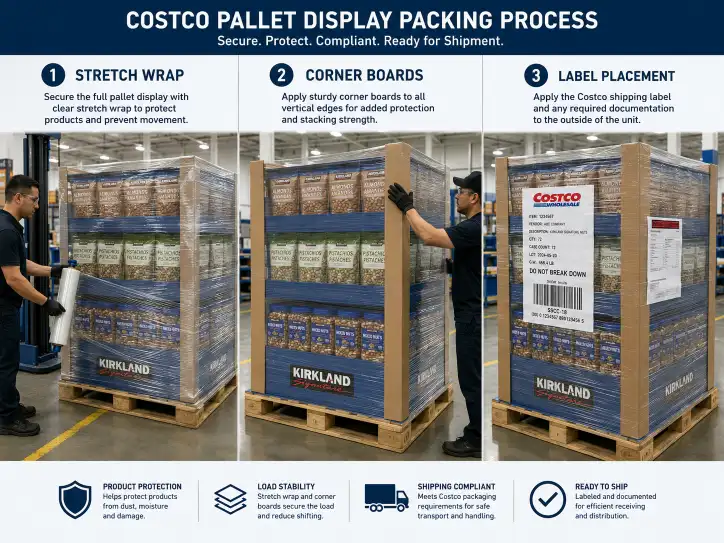
- Packing — Stretch wrap (3–5 layers), corner boards, edge protectors
- Labeling — All required labels applied to the finished pallet
Packing Confirmation
Before the container is loaded, confirm:
- Stretch wrap coverage (full, base reinforced, no loose ends)
- Corner boards on all 4 pallet corners
- Labels visible on minimum 2 sides
- Pallet skirt in place (if specified)
- Container loading plan confirmed with forwarder
For pre-filled display details, see our Pre-Filled Pallet Displays guide.
Stage 9: Shipment and Delivery
The final stage moves the displays from the factory to the Costco distribution center.
Before Shipment
| Check Item | Description |
|---|---|
| Container loading plan | Factory provides a loading diagram with pallet count and arrangement |
| Packing list | Itemized list of all units, pallets, and cartons |
| Photos of loaded container | Photos showing how the container was packed |
| Forwarder coordination | Factory coordinates with the brand's freight forwarder |
| Export documents | Bill of lading, certificate of origin, packing list |
At the Distribution Center
When the shipment arrives at the Costco distribution center:
- Labels are scanned for receiving
- Display condition is checked
- Any visible damage is documented
- Non-compliant displays may be rejected
After Delivery
Keep all documentation — test reports, label approvals, and shipping documents — in the project file. If Costco requests additional information after delivery, having the documentation ready prevents delays.
For shipping and export specifications, see our SHIPPING page.
Common Approval Delays and How to Avoid Them
Even experienced vendors encounter delays. Here are the most common ones and how to avoid them.
| Delay | Cause | Prevention |
|---|---|---|
| Buyer unresponsive | Buyer is busy or the proposal lacks clarity | Send a concise brief with clear requirements |
| Multiple sample rounds | Incomplete design brief or poor factory communication | Confirm dieline details before sampling |
| Missing test reports | Factory does not have testing equipment | Confirm testing capability before engaging the factory |
| Label rejection | Label format does not match Costco specs | Send label artwork to buyer for pre-approval |
| Product fit issues | Product dimensions changed after design | Always test with the final product packaging |
| Co-packing delays | Products arrive late at the factory | Plan product delivery to the factory 2 weeks before loading |
| Container loading issues | Pallet count does not match container capacity | Get a loading diagram before production |
| Shipping damage | Insufficient packing protection | Test transit with the actual packed display |
Buyer Checklist for Costco Display Approval
| Check Item | Status | Notes |
|---|---|---|
| Buyer confirmed interest | ☐ | Written confirmation or email |
| Buyer requirements documented | ☐ | Height, footprint, pre-filled, labeling |
| Structural design completed | ☐ | Dieline approved |
| Board grade confirmed | ☐ | Based on product weight |
| Structural sample passed | ☐ | Fit, assembly, load test |
| Printed sample approved | ☐ | Color, registration, readability |
| Product-loaded sample tested | ☐ | Real product, transit tests passed |
| Test reports provided | ☐ | ECT, vibration, drop, tilt |
| Labels approved by buyer | ☐ | Written confirmation |
| Pre-shipment sample approved | ☐ | From production run |
| Co-packing and packing confirmed | ☐ | Stretch wrap, corner boards, labels |
| Container loading plan ready | ☐ | Loading diagram from factory |
Conclusion
The Costco display approval process has multiple stages, and each one requires attention to detail. The vendors who move through the process fastest are those who prepare before engaging the factory — confirming dimensions, testing requirements, and labeling specifications with the buyer first.
For new vendors, the most important advice is: do not rush the sample and testing stages. A rejected sample costs time, but a rejected shipment costs time and money. Take the extra week to confirm the structural test results and label approvals before production starts.
If you are preparing a display for Costco approval, start with the Costco Pallet Display Requirements guide for complete specifications, and review our COSTCO DISPLAYS product page for display options. For factory selection guidance, see our Costco Display Manufacturer guide.
FAQ
How long does the Costco display approval process take?
The full process from initial buyer discussion to shipment typically takes 8–16 weeks. Sample and testing stages account for 4–8 weeks of that timeline.
What is the first step in getting a Costco display approved?
The first step is buyer discussion. Without buyer interest, there is no project. The buyer confirms the display format, height limits, labeling requirements, and testing standards.
What structural tests does Costco require?
Costco typically requires ECT (compression) testing, vibration testing, drop testing, and tilt testing. Food and beverage displays may need additional moisture and leak testing.
How many sample rounds are typical for Costco display approval?
Most projects need 2–3 sample rounds: 1–2 structural (blank) samples for fit testing and 1 printed sample for visual approval. Complex designs may need additional rounds.
Can I start production before labels are approved?
No. Never start production before all labels have been approved by the Costco buyer. Label changes after production starts cause waste and delays.
What causes Costco display rejection at the receiving dock?
The most common rejection reasons are incorrect labels, wrong pallet dimensions, overheight displays, missing test reports, and visible damage during transit.
Do I need a pre-shipment sample?
Yes. A pre-shipment sample from the actual production run confirms that production quality matches the approved sample. This is a standard best practice for Costco projects.
How do I find a factory that can handle Costco display approval?
Look for factories with Costco display experience, in-house structural testing, GS1-128 labeling capability, and co-packing services. These capabilities reduce the approval timeline significantly.