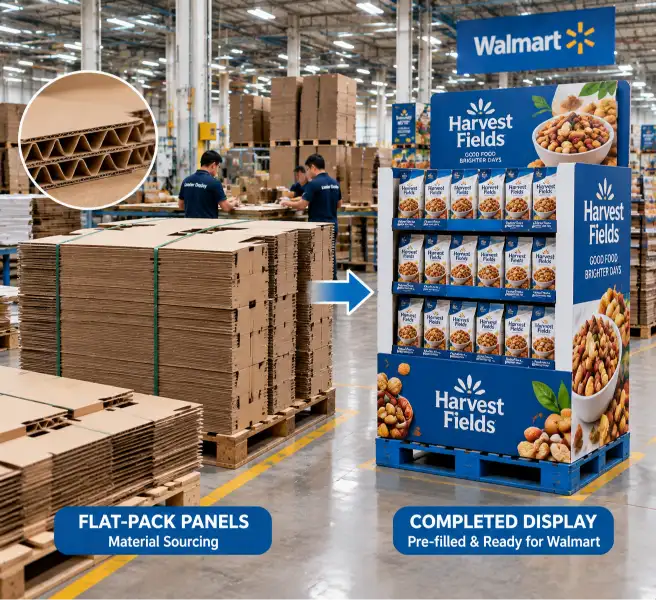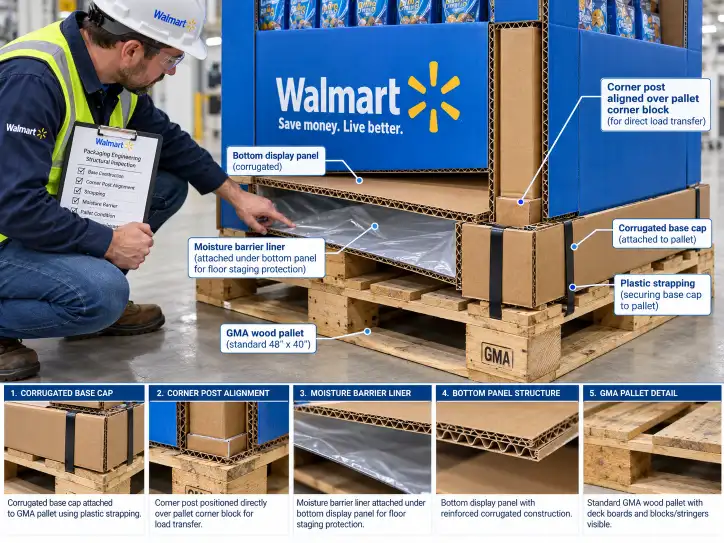
Every Walmart pallet display carries two layers of requirements: the structural specifications covered in our structural engineering guide, and the graphics and branding requirements that determine how the display looks, what labels it carries, and how it presents the product at the shelf. Walmart's graphics standards differ from club store programs because the store environment, aisle layout, and signage hierarchy follow a different set of rules.
This guide covers Walmart display graphics and branding from the factory floor: how print methods are selected for Walmart's display formats, what labels are required on every display, how header and sign graphics are produced to Walmart's specifications, and how the factory manages brand color accuracy, finishing, and packaging graphics for Walmart programs. It is the graphics companion to our material sourcing guide — that guide covers what the display is made of; this guide covers how it looks and what information it carries.
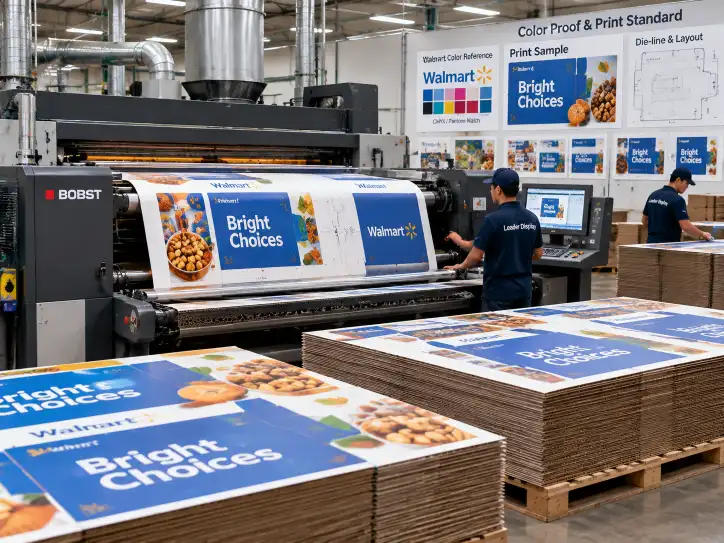
01 How Walmart Graphics Requirements Differ from Club Store Programs
Walmart's graphics and branding standards are shaped by the way Walmart stores are laid out and shopped. A display that looks excellent in a club store environment may need different graphics treatment to perform in a Walmart Supercenter or Neighborhood Market.
| Graphics Factor | Walmart Requirement | Club Store Comparison |
|---|---|---|
| Header visibility | Header must be readable from 30+ feet down the aisle — larger text, higher contrast | Club stores allow smaller headers — closer aisle proximity means less distance requirement |
| Brand panel placement | Branding on 3+ visible sides of the display (front, left, right) | Club stores often use 4-side branding — the display sits in open floor space |
| Signage hierarchy | Displays carry in-ad sign holders or adhesive sign pockets — the sign must fit Walmart's standard sign frame | Club stores use integrated header graphics — no separate sign holder required |
| Shelf strips | Price channel strips required on each shelf facing (Walmart-specific strip dimensions) | Club stores often skip shelf strips — price is on the bulk pack or pallet tag |
| Label placement | Display ID label front AND back; pallet label on 2+ sides | Club stores typically require front label only |
| Print quality | Walmart accepts flexo on most formats; litho-lam for premium programs | Club stores push toward litho-lam or litho-laminated for more programs |
| Color accuracy | Brand color must match PMS within tolerance; in-store lighting (LED/fluorescent) is considered | Club stores use similar PMS standards but under different (typically daylight-balanced) lighting |
Why Walmart Graphics Standards Exist
Walmart runs a higher-density store environment than club stores. A Walmart Supercenter carries 120,000+ SKUs, and the display graphics must differentiate the product within a crowded aisle, not just present it on an open warehouse floor. Walmart's graphics requirements are designed to ensure that every display — from a full pallet in the power aisle to a PDQ tray on a grocery shelf — meets a consistent visual standard across the entire chain.
02 Print Method Selection for Walmart Displays
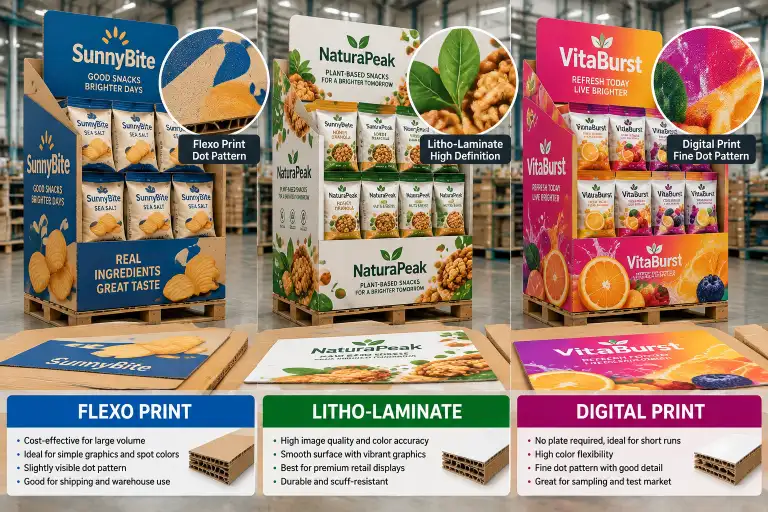
The print method for a Walmart display is selected based on where the display will be placed, how long the program runs, and what budget the program has. Walmart accepts a wider range of print methods than club stores, which gives vendors more flexibility at different price points.
Print Methods Used in Walmart Programs
| Print Method | Best For Walmart | Typical Cost Level | Graphics Quality |
|---|---|---|---|
| Flexographic (pre-print) | Full pallet displays, bulk programs, standard grocery displays | $ — Lowest per-unit cost | Good — solid coverage, acceptable for text and simple brand graphics |
| Flexographic (post-print) | PDQ trays, shelf-ready packaging, short-run programs | $ — Low, but higher than pre-print at volume | Good — but registration tolerance is wider; best for simple designs |
| Litho-laminate | Premium pallet displays, seasonal programs, high-visibility power aisle displays | $$$ — Highest cost | Excellent — photographic quality, fine text, complex brand graphics |
| Litho-laminate spot | Header-only premium, body in flexo; cost-optimized programs | $$ — Middle | Header: excellent; body: good |
| Screen print / spot | Large headers, high-visibility signs, short-run premium | $$ — Middle | Excellent for solid color areas; not suitable for fine detail |
| Digital print | Short-run programs, test markets, regional programs with low quantities | $$ — Higher per-unit but no plate cost | Very good — photographic quality, full color, variable data possible |
The Walmart Print Decision Sequence
| Step | Question | Decision |
|---|---|---|
| 1 | What is the program volume? | Over 5,000 units → flexo (pre-print); under 5,000 → consider digital or litho-lam |
| 2 | Where will the display be placed? | Power aisle → litho-lam or litho-lam header; grocery aisle → flexo is usually sufficient |
| 3 | How many colors are in the brand design? | 1–3 spot colors → flexo; full color / photographic → litho-lam or digital |
| 4 | Is there fine text or small logo detail? | If under 6pt text or intricate logos → litho-lam recommended |
| 5 | What is the program duration? | Short-term (under 4 weeks) → flexo is acceptable; long-term → consider litho-lam for sustained shelf presence |
| 6 | Will the display be pre-filled or flat-pack? | Pre-filled → flexo is standard; flat-pack → litho-lam may be more practical because panels print flat with no assembly interference |
For a detailed comparison of each print method's process, plate cost, minimum order quantity, and quality characteristics, see our display printing and finishing methods guide — the same methods apply; only the selection criteria shift toward Walmart's store environment and program volume.
03 Header and Sign Graphics for Walmart Programs
The header is the most visible part of a Walmart display. It must communicate the brand message, product name, and promotional offer from across the aisle. Walmart's header graphics standards are more prescriptive than many other retailers.
Header Size and Placement Requirements
| Display Type | Header Size (Typical) | Placement | Notes |
|---|---|---|---|
| Full pallet display (power aisle) | 48" wide × 18–24" tall | Top front, locked into display structure | Must be readable from 30+ ft |
| Full pallet display (grocery aisle) | 48" wide × 12–18" tall | Top front or top side | Lower height acceptable in narrower aisles |
| Half pallet display | 24" wide × 12–18" tall | Top front | Proportional to footprint |
| Quarter pallet display | 24" wide × 10–12" tall | Top front | Small format — text must be large and bold |
| PDQ / tray display | 12–18" wide × 6–10" tall | Top or back panel | Often printed directly onto the display board |
Header Graphics Checklist
| Check | Detail |
|---|---|
| Brand logo must appear on the header front | Positioned top third of the header panel |
| Product name must be visible from 30+ ft | Minimum 2-inch-tall text for primary message |
| Promotional messaging (if applicable) | Must match the current Walmart ad cycle; verify with buyer |
| No pricing on the header | Walmart controls pricing at the shelf — do not print retail prices on header graphics |
| Header must be structurally locked | Header must be attached to the display in a way that prevents it from detaching during transit or store handling |
| Header may carry a sign holder pocket | Some programs require a standardized sign holder for in-ad signage |
Sign Holders and In-Ad Signage
Walmart uses standardized sign frames for in-ad promotional signs. Displays that are part of a weekly ad or promotional event may need to accommodate a sign holder.
| Sign Type | Attachment Method | Provided By |
|---|---|---|
| In-ad sign (plastic frame) | Adhesive pocket or slot on the header | Store team attaches the sign; display must have the pocket or slot |
| Shelf-edge sign | Clip-on or adhesive shelf strip | Store team |
| Side panel sign | Adhesive pocket or integrated slot | Store team or pre-attached |
For how sign and header graphics are produced to Walmart's structural requirements and how the production files are prepared for the factory, see our display artwork and print file specs guide.
04 Required Labels on Walmart Displays
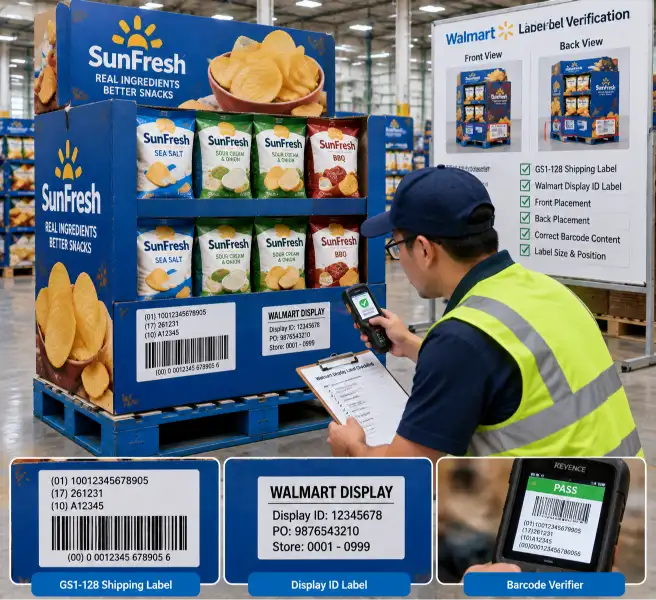
Walmart requires a specific set of labels on every pallet display. Missing or incorrect labels are a common reason for display rejection at Walmart distribution centers.
Every Display Must Carry These Labels
| Label | Location | Content | Notes |
|---|---|---|---|
| Display ID label | Front AND back of display | Display ID number (from Retail Link), vendor number, display description | Two labels — one on each side — are required; one label is not sufficient |
| GS1-128 barcode label | Outside of display, readable without unpacking | GS1-128 barcode with display-level GTIN | Matches the display-level barcode registered in Retail Link |
| Price label / shelf strip | Each shelf facing | Retail price (if provided by buyer) or price channel | Some programs use a "no price" strip |
| Product information label | Bottom of display or side panel | Product name, count, display dimensions, weight | Used by DC and store teams during putaway |
| Pallet label | Pallet stringer, 2+ sides | SSCC-18 barcode, ship-to location, PO number, case count | Standard Walmart pallet label format |
| ISPM 15 stamp | Pallet wood (if wood pallet used) | Heat treatment mark | Required on any wood pallet entering Walmart's supply chain; not needed on plastic pallets |
| Recyclability label | Bottom or side of display | Material type, recycling instructions | Walmart requires clear recycling guidance on the display structure |
Label Format Specifications
| Label Element | Specification |
|---|---|
| Label material | White synthetic or paper label with permanent adhesive — must not detach in transit or handling |
| Barcode quality | GS1-128 barcode must pass ANSI Grade C (2.5) minimum — verify with a barcode verifier before shipping |
| Font size | Human-readable text: minimum 8pt for standard information, minimum 12pt for display ID |
| Label placement | Labels must be on the permanent display structure, not on removable packaging or stretch wrap |
| Durability | Labels must survive the Walmart distribution environment — multiple handling touches, temperature variation, and standard moisture exposure |
Common Label Rejection Reasons at Walmart DCs
| Rejection Reason | Prevention |
|---|---|
| Display ID label only on one side | Always apply front AND back labels |
| Barcode fails ANSI Grade C | Verify barcode quality with a verifier before shipment |
| Label on removable packaging | Apply labels to the permanent display board, not to stretch wrap or outer wrap |
| Label unreadable after transit | Use permanent adhesive synthetic labels; position labels away from handling contact points |
| Missing pallet label | Apply SSCC-18 pallet label to 2+ pallet sides |
For the full breakdown of Walmart display labels, dimensions, and barcode specifications, see the labels section of our Walmart pallet display requirements guide.
05 Brand Color Accuracy and Print Quality Standards
Walmart does not publish a universal color specification for display graphics the way some retailers do, but the expectation is that brand colors are accurately reproduced and consistent across the display. The factory manages color accuracy through the same process used for club store programs, with adjustments for Walmart's store lighting environment.
Color Management on Walmart Displays
| Factor | Standard Practice | Why It Matters for Walmart |
|---|---|---|
| PMS matching | Match brand colors to PMS values before production | Walmart stores use mixed lighting (LED + fluorescent); PMS matching ensures the brand color reads correctly under both |
| Proof approval | Digital or press proof must be approved before mass production | Walmart does not review color proofs, but if the buyer rejects color on delivery, the factory bears the reprint cost |
| Print-to-print consistency | Same print job must produce the same color across all display units | Walmart store teams place multiple displays from the same program — color variation between units creates a poor in-store presentation |
| Ink density | Maintain consistent ink density across the full print run | Walmart power aisle lighting is bright — low ink density looks washed out compared to pallet displays from other vendors |
| Board color impact | Kraft board color affects the printed color — lighter board carries color more accurately | For Walmart programs, specify lighter board or white-top liner for flexo print areas where color accuracy matters |
Print Quality Standards
| Print Quality Check | Acceptable for Walmart | Not Acceptable |
|---|---|---|
| Registration tolerance | Flexo: ±1mm; Litho-lam: ±0.2mm | Misregistration visible at 2ft viewing distance |
| Ink coverage | Solid coverage with no pinholing | Streaking, missing ink, or visible board color through printed areas |
| Text readability | All text must be readable at the specified viewing distance | Smudged, broken, or unclear characters |
| Score and fold quality | Printed score lines must align with the fold | Print cracking at score lines; graphics damaged by folding |
| Die-cut edge quality | Clean edges with no ragged board | Visible fiber tear or crush marks from dull dies |
The Factory Color Approval Process for Walmart Programs
- Color specification — Brand PMS values are confirmed against the buyer's artwork file
- Proof production — A digital or press proof is produced showing the printed colors on the actual board grade
- Buyer or brand approval — The proof is sent for approval; the buyer reviews against the brand standard
- Press-side color check — During the production run, the first pull is checked against the approved proof
- Ongoing quality check — Every Nth unit (typically every 50–100) is pulled and checked for color drift
06 Finishing and Surface Treatment for Walmart Displays
Finishing and surface treatments protect the graphics during transit and handling and can affect how the display presents in the store. Walmart's shorter transit routes and regional supply chain mean the finishing requirements are typically less demanding than club store programs.
| Finishing Method | Best Use for Walmart | Cost Impact |
|---|---|---|
| Aqueous coating | Flexo-printed displays — protects ink from scuffing during handling | Low — standard for flexo programs |
| UV coating | Litho-lam headers and premium panels — high-gloss finish for power aisle displays | Medium — applied to litho-lam only |
| Matte lamination | Premium displays where glare reduction matters (brightly lit Walmart aisles) | Medium-high — adds cost but improves readability under strong store lighting |
| Spot UV (highlights) | Selected brand elements (logo, product image) — draws attention in crowded aisles | High — premium treatment for high-visibility programs |
| No coating | Short-run or temporary programs where the display life is under 4 weeks | None — not recommended for any program lasting longer than 2 weeks |
07 Packaging Graphics and Case Labeling
For Walmart programs that ship pre-filled on pallets, the packaging graphics on the outer case or display structure must meet Walmart's case labeling standards. This is separate from the display graphics — it is the labeling that the Walmart DC reads when receiving and routing the display.
Case and Pallet Graphics for Walmart Programs
| Label Type | Required Information |
|---|---|
| Master case label | UPC, product description, case count, case weight, dimensions, lot number |
| Pallet display label | Display ID, vendor number, PO number, display quantity, display dimensions, weight |
| Pallet-level label | SSCC-18 barcode, ship-to DC, carton count on pallet, weight, carrier |
| Mixed pallet label | If multiple display types are on one pallet — list all display IDs and quantities |
The Graphics Production Sequence for a Walmart Program
- Artwork files received from buyer — Review for Walmart-specific requirements (no pricing on header, correct logo usage)
- Print method selected — Based on program volume, display placement, and budget
- Print files prepared and color-matched — PMS values confirmed; proofs produced on actual or simulating board
- Labels designed and ordered — Display ID labels, GS1-128 labels, pallet labels produced to Walmart format
- Proof approved — Buyer or brand team confirms color and layout
- Production run — Graphics printed, finishing applied, labels applied to correct positions
- Post-production check — Barcode verification, color check, label placement check
For how the labels integrate with the overall display program compliance, see our Walmart pallet display requirements guide.
08 How the Factory Produces Graphics for a Walmart Program
A factory that produces graphics for Walmart programs follows a repeatable sequence. The key is that the sequence starts with the program volume and placement — not with a default assumption about which print method or label format to use.
- Confirm the program volume and placement — Volume determines print method; placement (power aisle vs. grocery aisle) determines header size and finishing
- Select the print method by volume and quality need — High volume, standard quality → flexo premium; low volume or high visibility → litho-lam or digital
- Prepare print files and match brand colors — PMS matching, proof production, buyer approval
- Produce labels to Walmart specifications — Display ID labels (front AND back), GS1-128 labels, pallet labels, recyclability labels
- Print, finish, and apply — Production run, coating/lamination (if selected), label application at correct positions
- Verify before shipment — Barcode quality check, color consistency check, label placement check, header readability check
This is how a factory proves it understands Walmart display graphics and branding requirements — not by applying a universal print method, but by selecting print, labels, and finishing that match Walmart's specific display format, program volume, and store placement.
FAQ
Q: What print method is standard for Walmart pallet displays?
A: Flexographic (pre-print) is the most common for full pallet displays at volume — it offers good quality at the lowest per-unit cost. Litho-laminate is used for premium programs, power aisle placements, and programs requiring photographic-quality graphics. The selection depends on the program volume, budget, and display placement.
Q: What labels are required on a Walmart display?
A: Every display must carry a Display ID label (front AND back), GS1-128 barcode label, price label or shelf strip per shelf, product information label, pallet label (SSCC-18), and recyclability label. Labels must be on the permanent display structure — not on stretch wrap or removable packaging.
Q: Can I print retail prices on the display header?
A: No. Walmart controls pricing at the shelf. Do not print retail prices on header graphics, shelf strips, or any part of the display structure. Pricing is added by the store team using Walmart's standard shelf strips or in-ad sign holders.
Q: Does Walmart require a specific color standard?
A: Walmart does not publish a universal color spec, but brand colors are expected to match PMS values within tolerance. The factory produces proofs for buyer approval, and color consistency across the run is checked during production. Walmart's store lighting (LED + fluorescent mix) should be considered when approving colors.
Q: Is litho-laminate required for Walmart power aisle displays?
A: Not always, but it is recommended. Power aisle displays compete for attention at 30+ feet, and the photographic quality of litho-laminate gives better shelf presence than flexo. Some Walmart programs approve flexo for power aisle if the brand design is simple and high-contrast.
Q: How does Walmart display graphics differ from Costco?
A: Three main differences: (1) Walmart requires labels on front AND back; Costco typically requires front only. (2) Walmart headers must be readable from 30+ feet and are often smaller than club store headers. (3) Walmart accepts flexo for more programs than Costco, which pushes toward litho-lam for most full pallet displays.
Q: What is the most common label rejection reason at Walmart?
A: Display ID label applied to only one side of the display. Walmart requires labels on both the front and back. Other common rejections: barcodes that fail ANSI Grade C verification, labels applied to stretch wrap (not the permanent structure), and unreadable labels after transit.
Q: Do I need a sign holder on my Walmart display?
A: Only if the display is part of a promotional program or weekly ad. Confirm with the buyer whether the display needs to accommodate an in-ad sign. If yes, the display must include a sign holder pocket or slot on the header that matches Walmart's standard sign frame dimensions.
Q: Can the factory apply labels during production?
A: Yes — labels are applied during the packing and finishing stage of production. The label positions and specifications should be confirmed before the production run starts to ensure correct placement and barcode quality.