
There are many types of electronics accessories sold at Costco — charging cables, wall chargers, phone cases, screen protectors, power banks, earbuds, smart home devices, and Bluetooth speakers, each with completely different packaging formats and weight profiles. For a tech brand entering Costco, the first step is understanding that the standard Costco pallet display requirements still apply — but electronics add layers of complexity that most other categories do not face. Cables tangle, small accessories get lost visually, hanging products need peg displays with correct hook spacing, boxed items need PDQ trays with secure compartments, and heavy power banks need reinforced pallet displays that can handle the weight. The display must also pass ISTA 3E transit testing without allowing products to shift, tangle, or fall out. So when you are designing a pallet display for electronics accessories at Costco, how do you balance the diverse packaging formats, weight ranges, and security concerns that tech products demand?
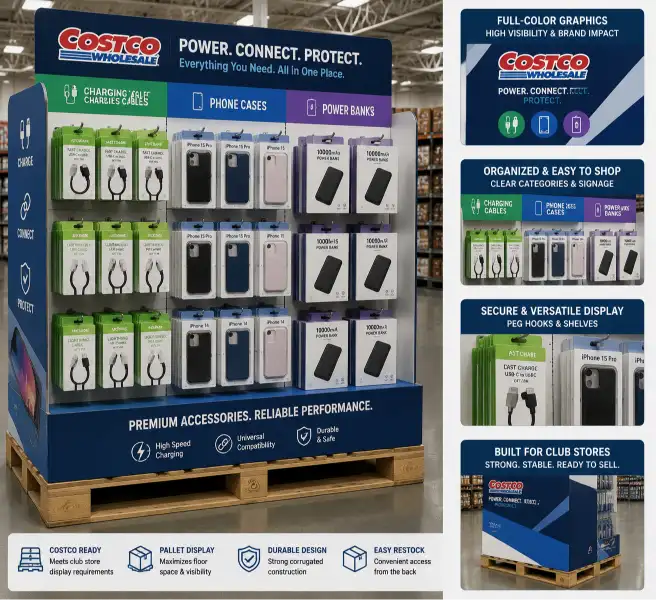
A Costco electronics display is a pre-filled pallet display designed specifically for consumer electronics and tech accessories sold at Costco and other club store retailers. Unlike standard pallet displays that hold uniform boxes or bags, electronics displays must accommodate blister packs, hanging cards, small boxes, polybags, and clamshell packaging — often within the same display. Products range from 0.05 lb charging cables to 2 lb power banks, and the display structure must handle this weight variation without collapsing or allowing lighter products to shift. At Leader Display, I have produced pallet displays for tech accessories, phone cases, charging products, and audio accessories destined for Costco and Sam's Club. The electronics category presents unique challenges: small products that get lost on a large pallet, hanging hooks that must be correctly spaced, and theft-prone items that need secure display solutions. This guide covers the structural design, display type selection, material choices, and compliance requirements specific to Costco electronics displays.
Why Electronics Need Different Pallet Displays at Costco
Unique Challenges of Electronics Displays at Club Stores
| Challenge | Why It Matters | Display Solution |
|---|---|---|
| Diverse packaging formats | Blister packs, hanging cards, boxes, and polybags on one pallet | Modular tray design with different compartment types per SKU |
| Wide weight variation | 0.05 lb cables to 2 lb power banks — mixed weight causes shifting | Heavy products at bottom, lightweight products secured in compartments |
| Cable tangling | Charging cables tangle together during transit | Individual compartments or polybag each cable before loading |
| Theft risk | Small electronics are high-value, easy to steal | Secure display design, consider tethering or staff-assisted placement |
| Hook spacing | Hanging products need correct hook spacing for easy browsing | Test hook spacing with actual packaged products before production |
| Label visibility | Shoppers need to see connector type, length, and compatibility | Clear shelf labels, icon-based navigation, color-coded SKU separation |
| Small product visibility | Small accessories get lost on a 40" × 48" pallet | Tiered display, sloped rows, contrasting shelf dividers |
Costco Electronics Display Volume by Category
| Electronics Category | Typical Display Volume | Average Unit Price | Display Duration | Seasonal Pattern |
|---|---|---|---|---|
| Charging cables (USB-C, Lightning) | 500–1,000 units | $5–$15 | 4–6 weeks | Year-round, peak in back-to-school |
| Wall chargers and adapters | 300–600 units | $10–$25 | 4–8 weeks | Year-round |
| Phone cases | 200–500 units | $10–$30 | 4–6 weeks | New phone launch cycles |
| Screen protectors | 400–800 units | $8–$20 | 4–6 weeks | Year-round, new phone launches |
| Power banks | 150–400 units | $15–$40 | 4–8 weeks | Q4 holiday peak, travel season |
| Earbuds and headphones | 200–500 units | $10–$50 | 4–8 weeks | Q4 holiday peak |
| Smart home devices | 100–300 units | $15–$60 | 4–6 weeks | Year-round, Q4 peak |
| Bluetooth speakers | 100–250 units | $20–$50 | 4–6 weeks | Q2–Q3 outdoor season, Q4 |
| Tech accessories kits | 200–400 units | $10–$30 | 4–6 weeks | Back-to-school, Q4 |
Costco Pallet Display Requirements for Electronics
Core Costco Requirements That Apply to All Electronics Displays
| Requirement | Specification | Why It Matters for Electronics |
|---|---|---|
| Pallet type | GMA spec 40" × 48" wood pallet | Standard for all Costco pallet displays |
| Max display height | 72" including pallet | Must fit in club store racks |
| ISTA 3E testing | Required — display must pass transit simulation | Critical for electronics — small products shift easily during transit |
| Graphic panels | Full-color printing on all 4 sides | Electronics are highly visual — all sides must show product benefits |
| Pre-filled | Display must be loaded with product at factory | Costco does not stock displays in-store |
| Pallet weight | Max 2,200 lbs per pallet | Electronics are typically well under this limit |
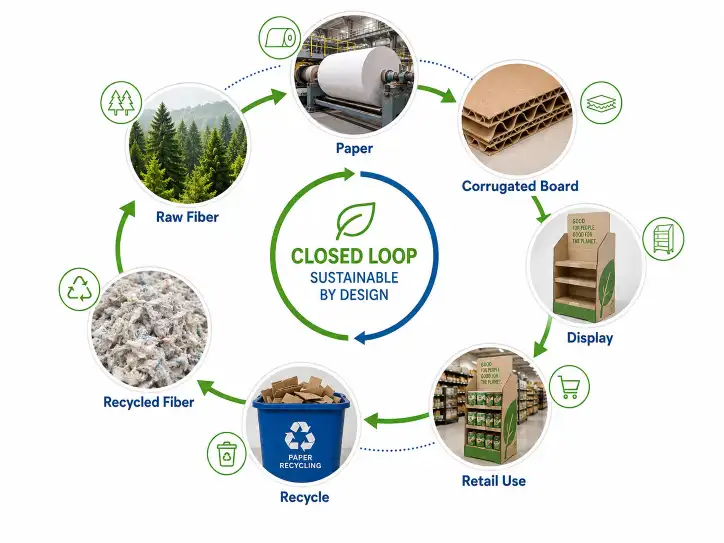
| Display disposal | Recyclable materials only (no plastic, no metal) | Costco sustainability requirements |
| Pallet jack access | 4-way entry required | For warehouse movement |
Additional Electronics-Specific Requirements
| Requirement | Why It Is Needed | Best Practice |
|---|---|---|
| Anti-tangle compartments | Prevents cables from tangling during transit | Individual compartments for each cable, or polybag each cable |
| Hook spacing optimization | Ensures hanging products are easy to browse | Minimum 1.5" between hooks, test with actual product packs |
| Theft deterrent design | Reduces risk of small item theft | Consider blister pack size, avoid easy-access open trays for high-value items |
| Weight distribution | Prevents display from tipping | Heavy items at bottom, lighter items at top |
| Clear compatibility labeling | Shoppers need to see device compatibility at a glance | Icon-based labels (USB-C, Lightning, Micro-USB) on shelf edges |
| Product retention | Keeps products in place during transit | Friction-fit compartments, cavity depth ≥ 50% of product height |
| Static control | Prevents ESD damage to sensitive electronics | Use anti-static polybags for sensitive components |
Standard Pallet Configurations for Electronics Displays
| Pallet Configuration | Display Height | Layers | Units per Layer | Total Units | Best For |
|---|---|---|---|---|---|
| Half pallet (40" × 24") | 60" | 4–5 | 15–30 | 60–150 | Phone cases, screen protectors, premium audio |
| Full pallet (40" × 48") | 60" | 4–5 | 30–60 | 120–300 | Cables, chargers, mixed accessories |
| Full pallet (40" × 48") | 72" | 5–6 | 30–60 | 150–360 | High-volume cables and adapters |
| Full pallet with peg section | 72" | 3–4 trays + 2 peg rows | 20–40 hanging + tray | 120–280 | Mixed hanging and boxed products |
Electronics Product Formats and Display Challenges
Electronics Package Types and Display Requirements
| Electronics Format | Typical Weight | Dimensions | Packaging Type | Display Density | Structural Demand |
|---|---|---|---|---|---|
| Charging cable (blister pack) | 0.05–0.1 lbs | 2" × 4" × 0.5" | Blister card with hang hole | Very high | Low — but anti-tangle is critical |
| Wall charger (blister pack) | 0.1–0.2 lbs | 3" × 5" × 1" | Blister card with hang hole | High | Low |
| Phone case (box) | 0.1–0.2 lbs | 6" × 4" × 1" | Slim paperboard box | High | Low |
| Screen protector (sleeve) | 0.05–0.1 lbs | 8" × 4" × 0.2" | Flat paperboard sleeve | Very high | Low — but needs flat storage |
| Power bank (box) | 0.5–1.0 lbs | 4" × 4" × 1.5" | Rigid box | Medium | High — heavy items need strong shelves |
| Earbuds (box) | 0.2–0.4 lbs | 4" × 3" × 1.5" | Paperboard box with window | High | Medium |
| Bluetooth speaker (box) | 0.5–2.0 lbs | 5" × 5" × 3" | Rigid box | Medium | High — heaviest electronics item |
| Smart plug / adapter (box) | 0.2–0.3 lbs | 3" × 3" × 2" | Small box | High | Medium |
| Tech kit (mixed bundle) | 0.5–1.5 lbs | 8" × 6" × 2" | Box or clamshell | Medium | High — bundle weight needs support |
Weight and Fragility Index by Electronics Type
| Product Type | Fragility Index (1–10) | Protection Required | Typical Damage |
|---|---|---|---|
| Charging cable (blister) | 2 | None — but anti-tangle design needed | Tangled cables, bent connectors |
| Wall charger | 3 | Individual compartment | Scuffed packaging, bent prongs |
| Phone case | 1 | None | None |
| Screen protector | 6 | Flat storage, no bending | Bent corners, creased packaging |
| Power bank | 4 | Individual compartment | Scuffed box, loose cables inside |
| Earbuds (wired) | 3 | Individual compartment | Tangled cables, crushed box |
| Earbuds (wireless, case) | 5 | Individual compartment with cushion | Scuffed charging case, crushed box |
| Bluetooth speaker | 4 | Individual compartment | Scuffed box, damaged speaker grille |
| Smart plug | 3 | Individual compartment | Scuffed packaging, bent prongs |
Display Types for Different Electronics Categories
Peg Displays for Hanging Electronics
Peg displays are the most common display type for electronics accessories that come in blister packs or hanging cards — cables, chargers, adapters, and small accessories. At Costco, peg displays are typically integrated into a pallet display structure, with the upper section featuring peg hooks and the lower section holding tray compartments.
| Design Element | Recommendation | Why |
|---|---|---|
| Hook type | Metal or plastic peg hooks rated for product weight | Blister packs vary in weight — hooks must not bend |
| Hook spacing | 1.5"–2" between hooks | Prevents packages from overlapping and hiding each other |
| Hook depth | 4"–6" from back panel | Must accommodate blister pack depth without protruding too far |
| Back panel | Double-wall corrugated, 44 ECT minimum | Supports the weight of multiple hanging products |
| Header sign | Full-color litho-laminated, visible from 10'+ | Electronics have many small details — header must communicate brand and category |
| Row labels | Clear shelf-edge labels for each row | Helps shoppers find USB-C vs Lightning vs Micro-USB |
PDQ Trays for Small Boxed Electronics
PDQ trays are ideal for small boxed electronics like phone cases, screen protectors, and smart plugs. They are pre-loaded at the factory and placed directly on the shelf or within a pallet display structure.
| Design Element | Recommendation | Why |
|---|---|---|
| Compartment size | Snug fit — no more than 1/8" gap on each side | Prevents products from shifting during transit |
| Tray depth | ≥ 50% of product height | Prevents products from falling out during handling |
| Tray material | B flute or E flute for lightweight items | Lightweight electronics do not need heavy corrugated |
| Dividers | Cross-lock dividers for multi-SKU trays | Keeps different products organized in the same tray |
| Front lip | Minimum 1" height | Keeps products in the tray when the display is moved |
Mixed Pallet Displays (Peg + Tray Combination)
For Costco electronics displays that include both hanging and boxed products, a mixed design is the most practical solution. The upper section uses peg hooks for cables and chargers, while the lower section uses tray compartments for power banks, speakers, and kits.
| Design Element | Recommendation | Why |
|---|---|---|
| Upper section | 2–3 rows of peg hooks | Best for lightweight hanging products |
| Lower section | 2–3 layers of tray compartments | Best for heavier boxed products |
| Transition | Solid shelf between peg and tray sections | Prevents items from falling between sections |
| Total height | 72" maximum including pallet | Must fit Costco rack height |
| Weight distribution | Heavy products at bottom, light at top | Prevents tipping and ensures stability |
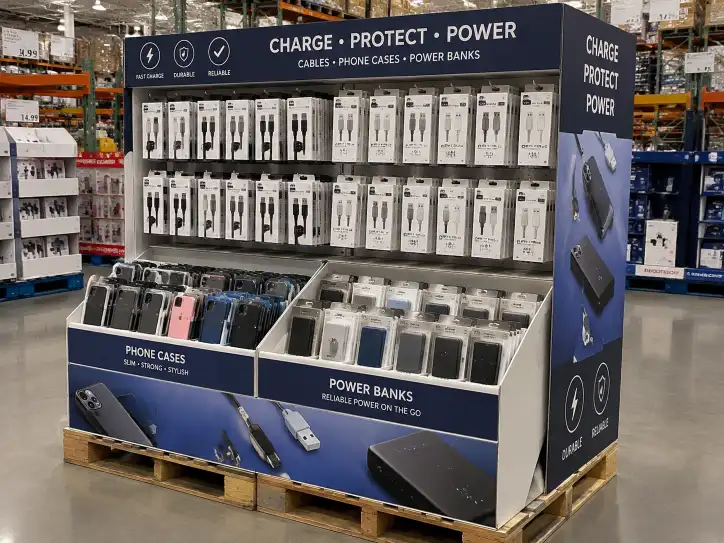
Display Design for Specific Electronics Products
Charging Cable Displays
| Design Element | Recommendation | Why |
|---|---|---|
| Cable management | Individual compartment per cable or polybag each cable | Prevents tangling — the most common complaint for cable displays |
| Hook type | Peg hook with 1.5" spacing | Cables are narrow — tight spacing maximizes SKU count |
| Labeling | Icon-based (USB-C, Lightning, Micro-USB) with color coding | Shoppers make quick decisions based on connector type |
| Tray option | PDQ tray with individual slots | Alternative to peg hooks — keeps cables separated and organized |
| Layer count | 5–6 layers | Cables are lightweight — higher stacking is safe |
| Branding | Clear category header, color-coded by connector type | Helps shoppers find the right cable quickly |
Phone Case Displays
| Design Element | Recommendation | Why |
|---|---|---|
| Display type | PDQ tray or shelf tray with individual compartments | Phone cases are boxed and need to stay upright |
| Compartment size | Snug fit for each case box | Prevents boxes from leaning or falling |
| Product orientation | Face-out, with phone model visible | Shoppers need to see which phone model the case fits |
| Labeling | Clear phone model labels on each row | iPhone 15 vs iPhone 16 vs Samsung — must be clearly marked |
| Layer count | 4–5 layers | Phone case boxes are lightweight but take up space |
| Branding | Full-color printing, lifestyle imagery | Phone cases are a fashion purchase — display must show the design |
Power Bank and Charger Displays
| Design Element | Recommendation | Why |
|---|---|---|
| Display type | Tray compartment in lower section of pallet | Power banks are heavy — must be placed in the lower half |
| Compartment size | Individual compartment per unit | Prevents shifting and scuffing during transit |
| Shelf reinforcement | Double-wall corrugated, 44 ECT | Power banks can weigh up to 1 lb each — shelves must be strong |
| Product orientation | Standing upright or flat | Either orientation works — confirm with product packaging |
| Layer count | 3–4 layers maximum | Power banks are heavy — higher stacking increases compression risk |
| Branding | Clear capacity display (mAh), compatibility info | Shoppers compare power banks by capacity and features |
Screen Protector Displays
| Design Element | Recommendation | Why |
|---|---|---|
| Display type | Flat tray or counter display | Screen protectors are flat — must be stored flat to prevent bending |
| Compartment size | Flat compartment, slightly larger than package | Prevents bending of the screen protector sleeve |
| Product orientation | Flat, stacked or in individual slots | Flat storage prevents warping |
| Labeling | Clear phone model and screen size on each row | Shoppers need to match screen protector to their device |
| Layer count | 4–5 layers | Screen protectors are lightweight and flat |
| Branding | Simple, clean graphics — focus on compatibility | Shoppers need technical information, not lifestyle imagery |
Earbud and Headphone Displays
| Design Element | Recommendation | Why |
|---|---|---|
| Display type | Individual compartment tray or peg hook | Depends on packaging — boxed earbuds need trays, hanging ones need hooks |
| Compartment size | Snug fit for each box | Prevents scuffing of premium packaging |
| Security consideration | High-value items — consider peggable security tags | Earbuds are a common theft target |
| Product orientation | Face-out, with product visible | Shoppers want to see the product design |
| Layer count | 4–5 layers | Earbuds are moderate weight — standard stacking is safe |
| Branding | Premium printing — matte lamination, spot UV | Audio products are premium purchases — display quality must match |
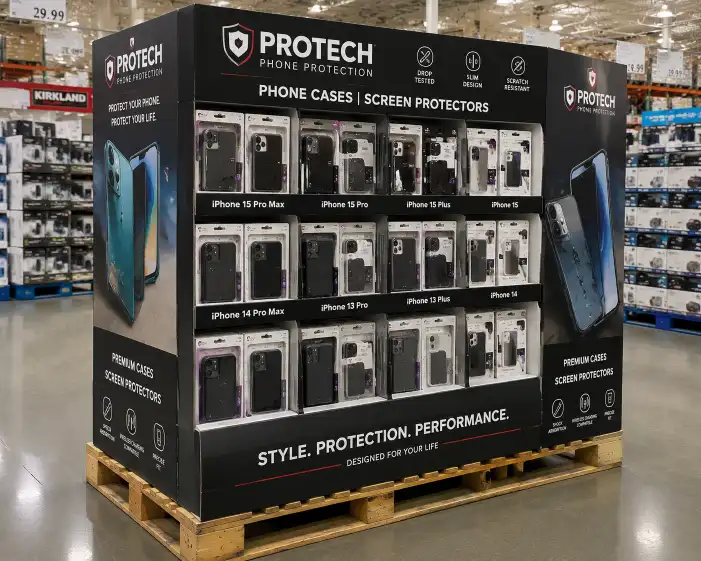
Material and Structural Recommendations
Recommended Materials by Electronics Category
| Electronics Category | Recommended Flute | Recommended Wall | Recommended Liner | Minimum ECT |
|---|---|---|---|---|
| Charging cables (lightweight) | E flute or B flute | Single-wall | White-top kraft | 26 ECT |
| Wall chargers | B flute | Single-wall | White-top kraft | 26 ECT |
| Phone cases | B flute | Single-wall | White-top kraft | 26 ECT |
| Screen protectors | E flute | Single-wall | White-top kraft | 23 ECT |
| Power banks | BC flute | Double-wall | White-top kraft or SBS | 44 ECT |
| Earbuds (boxed) | B flute | Single-wall | SBS | 29 ECT |
| Bluetooth speakers | BC flute | Double-wall | White-top kraft | 44 ECT |
| Mixed accessory displays | BC flute (bottom), B flute (top) | Mixed | White-top kraft | 32 ECT |
Tray Design Comparison for Electronics
| Tray Type | Best For | Protection Level | Cost Index | Assembly Time |
|---|---|---|---|---|
| Open tray with row dividers | Boxed phone cases, power banks | Medium | 1.0× (baseline) | 1–2 min |
| Individual compartment tray | Charging cables, earbuds | High | 1.4× | 3–5 min |
| Slotted cable tray | Individual cables, anti-tangle | Very high | 1.6× | 3–4 min |
| Cross-lock divider tray | Multi-SKU boxed items | Medium | 1.2× | 2–3 min |
| Peg hook panel | Hanging blister packs | Medium | 1.3× | 2–3 min |
| Mixed peg + tray display | Cables + power banks | High | 1.5× | 5–8 min |
Compression and Stacking Guidelines for Electronics Displays
| Layer Position | Product Type | Recommended Tray Material | Max Layers Above |
|---|---|---|---|
| Bottom layer | Power banks, speakers (0.5–2.0 lbs) | Double-wall BC flute, 44 ECT | 3–4 layers |
| Middle layers | Phone cases, chargers (0.1–0.5 lbs) | Single-wall B flute, 26 ECT | 2–3 layers |
| Top layer | Cables, screen protectors (0.05–0.1 lbs) | Single-wall E or B flute, 26 ECT | 0–1 layers |
Printing and Finishing for Electronics Brands
Recommended Printing Methods
| Electronics Category | Recommended Printing | Why | Cost Index |
|---|---|---|---|
| Premium audio (headphones, speakers) | Litho laminated | Photo-quality, matches brand packaging | 1.0× (baseline) |
| Phone cases | Litho laminated | Must show lifestyle imagery and phone model details | 1.0× |
| Charging cables and chargers | Flexo 4-color or litho laminated | Good quality at lower cost, practical for high-volume | 0.6× |
| Power banks | Litho laminated | Must show capacity and features clearly | 1.0× |
| Screen protectors | Flexo 4-color | Simple graphics, compatibility-focused | 0.6× |
| Mixed accessory displays | Litho laminated | Consistent quality across all product categories | 1.0× |
Finishing Recommendations
| Brand Tier | Recommended Finish | Why |
|---|---|---|
| Premium audio brand | Matte lamination + spot UV | Sophisticated look, matches premium product positioning |
| Mid-range electronics | Gloss lamination | Vibrant colors, durable, cost-effective |
| Value / multi-pack | Aqueous coating | Lowest cost, sufficient protection for short-term displays |
| Phone case / lifestyle | Gloss lamination with UV highlights | Bright colors attract attention, durable for handling |
| Eco-friendly brand | Matte lamination or uncoated | Natural look, aligns with sustainability messaging |
For more details on printing and finishing options, see our custom display printing and finishing methods guide.
ISTA Testing for Electronics Displays
Why ISTA Testing Is Critical for Electronics Displays
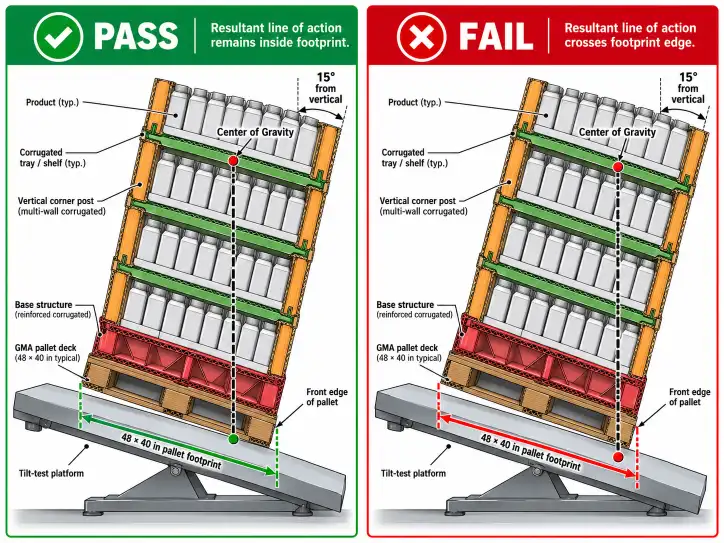
Electronics displays contain products of widely varying weights and packaging formats, making them more prone to transit damage than displays with uniform products. ISTA 3E testing simulates the palletized shipment environment, including vibration, shock, compression, and tip-over. For electronics displays, the most common testing failures are:
| Failure Mode | Cause | Prevention |
|---|---|---|
| Cable tangling | Vibration causes cables to shift and tangle | Individual compartments, polybag each cable |
| Product shifting | Mixed weight products move during transit | Secure compartment fit, heavy products at bottom |
| Hook damage | Heavy hanging products tear hook holes | Reinforced hook area, correct ECT for product weight |
| Tray collapse | Inadequate compression strength for heavy items | Use correct flute and ECT for weight load |
| Product ejection | Products fall out of trays during handling | Cavity depth ≥ 50% of product height |
| Screen protector bending | Vibration or impact causes bending | Flat storage, rigid compartment design |
Testing Protocol for Electronics Displays
| Test | Standard | What It Simulates | Electronics-Specific Concern |
|---|---|---|---|
| Vibration | ISTA 3E | Truck transport vibration | Cables tangling, products shifting |
| Shock / drop | ISTA 3E | Handling during loading and unloading | Hook damage, product ejection |
| Compression | ASTM D642 | Stacking in warehouse | Tray collapse under weight of heavy products |
| Tip-over | ASTM D5738 | Display stability on retail floor | Displays with mixed weight — top-heavy risk |
| Incline impact | ISTA 3E | Pallet handling impacts | Corner damage, shifting of internal trays |
| Hook pull test | Internal | Product removal by shoppers | Hook hole tearing, back panel deformation |
Electronics Display Testing Cost Estimates
| Test Type | Estimated Cost | Recommended For |
|---|---|---|
| ISTA 3E (full pallet) | $1,500–$3,000 | All electronics pallet displays |
| Compression test (per tray) | $300–$800 | Each tray design variation |
| Hook pull test | $200–$500 | Each hook design |
| Drop test (individual package) | $100–$300 | New packaging format |
| Full test suite | $2,500–$4,500 | New display designs with mixed-weight products |
Costco Electronics Display Approval Process
Step-by-Step Approval Timeline
| Step | Action | Timeline | Responsible Party |
|---|---|---|---|
| 1 | Review Costco vendor requirements | 4–6 weeks before order | Vendor |
| 2 | Design display with electronics-specific features | 3–4 weeks before order | Vendor + manufacturer |
| 3 | Request pre-production sample | 6–8 weeks before order | Manufacturer |
| 4 | Perform ISTA 3E testing | 4–6 weeks before order | Testing lab |
| 5 | Submit sample and test report to Costco | 4–6 weeks before order | Vendor |
| 6 | Order materials and begin production | 3–6 weeks before delivery | Manufacturer |
| 7 | QC during production — electronics-specific checks | During production | Manufacturer |
| 8 | Pre-shipment inspection | 1 week before shipment | Manufacturer + vendor |
| 9 | Ship to Costco distribution center | Per Costco schedule | Vendor + carrier |
For the full Costco approval process, see our Costco display approval process guide.
FAQ
What is the best display type for electronics at Costco?
A pre-filled full pallet display (40" × 48") with a mixed design is the standard format for Costco electronics displays. The upper section should use peg hooks for hanging products like cables and chargers, and the lower section should use tray compartments for boxed items like power banks and phone cases. The display must have full-color graphics on all four sides and pass ISTA 3E testing.
Do electronics displays need individual compartments for each product?
For cables, yes — individual compartments prevent tangling, which is the most common complaint for electronics displays. For hanging products like blister packs, peg hooks are sufficient. For boxed items like power banks and speakers, individual compartments prevent scuffing and shifting. The cost of individual compartments is offset by the reduced risk of damaged products and chargebacks.
How do I prevent cables from tangling in a Costco pallet display?
The best solution is to pack each cable in a polybag before loading it into the display. Alternatively, use individual slotted compartments that hold each cable separately. Do not simply dump cables into a tray — they will tangle during transit and arrive at the store in a mess that takes staff hours to sort.
What material is best for a Costco electronics display?
For mixed electronics displays, use BC flute double-wall corrugated for the bottom layers (where heavier items sit) and B flute or E flute single-wall for the top layers (where lightweight cables and screen protectors sit). Use white-top kraft liner for good print quality. For premium electronics brands, use SBS liner for the highest print quality.
What printing method should I use for an electronics display at Costco?
Litho-laminated printing is recommended for most electronics displays at Costco. It provides the photo-realistic print quality needed to show product details, device compatibility, and lifestyle imagery. For budget-friendly high-volume displays, flexo 4-color printing is a cost-effective alternative. For premium audio brands, add matte lamination or spot UV.
Do electronics displays need ISTA testing for Costco?
Yes — Costco requires ISTA 3E testing for all pallet displays, including electronics. The testing is especially important for electronics displays because products vary so widely in weight and packaging format. A display that passes ISTA testing before production is far less likely to arrive with tangled cables, shifted products, or damaged packaging.
How many SKUs can a single Costco electronics display hold?
A standard full pallet display (40" × 48", 72" tall) can hold 4–12 SKUs depending on product size. For mixed displays with peg hooks and tray compartments, aim for 6–8 SKUs. Too many SKUs in a single display makes it difficult to organize and presents a cluttered appearance. I recommend limiting electronics displays to 8 SKUs for optimal visual impact.
How should electronics products be protected during shipping to Costco?
Each product should be in a secure compartment or on a correctly sized peg hook. For cables, use polybagging or individual slotted compartments. For heavy items like power banks, use reinforced shelves with double-wall corrugated. For screen protectors, ensure flat storage to prevent bending. The display must pass ISTA 3E testing, which simulates the vibration, shock, and compression experienced during shipping.
What is the minimum order quantity for a Costco electronics display?
The MOQ for a Costco pallet display is typically 500–2,000 units, depending on the complexity of the display and the number of SKUs. Electronics displays with mixed peg and tray sections have higher MOQ due to the additional structural components required. For a detailed breakdown of MOQ by display type, see our cardboard display MOQ guide.
What is the typical lead time for a Costco electronics display?
The typical lead time is 8–12 weeks from order to delivery, including design (2–3 weeks), pre-production sample (2–3 weeks), ISTA testing (2–3 weeks), production (3–5 weeks), and sea freight (4–6 weeks). For faster delivery, air freight is available but adds significant cost. Plan your Costco electronics display program at least 3–4 months in advance of the desired in-store date.
For more information on retail display standards and electronics packaging requirements, refer to the ISTA testing procedures and Costco vendor compliance standards. For electronics products sold in the US market, ensure compliance with applicable FCC regulations for electronic devices and the Consumer Technology Association guidelines for accessory packaging and labeling.

One Response